Car Launch Physics Playground
Driving Racing Simulation Physics Browser Game Casual
Car Launch Physics Playground
71
Developer: Kill Pixel Interactive
Updated: 2026-10-01

Reviews

Car Launch Physics Playground focuses on one idea: how speed, angle, and impact shape a vehicle's jump or crash. The cartoon visuals and comical deformations keep the tone light, while challenge mode and free play serve both goal-oriented and exploratory players. Vehicle unlocks add variety through weight, acceleration, and durability differences. The main limitation is scope: this is a physics toy, not a full racing game, so players seeking structured circuits or competition may find it thin.

Description

Core Physics and Player Goals

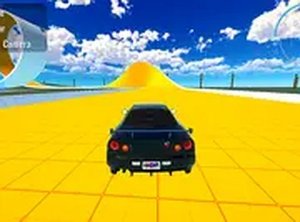
Car Launch Physics Playground works like a digital lab for vehicle dynamics. The central loop is simple: pick a car, build speed toward a ramp, and watch the physics engine calculate the jump or collision. Approach speed and ramp angle directly influence trajectory and damage, so each attempt gives immediate visual feedback you can use to adjust the next run. The environment also includes interactive elements such as large hammers and moving presses that react to vehicle contact, adding unpredictability to every attempt.

Challenge Mode vs. Free Play

Two modes serve different goals. Challenge mode assigns specific objectives, like reaching a certain jump distance or hitting a designated target, which gives runs structure and a sense of progression. Free play strips away objectives entirely, letting you explore the physics system at your own pace. That split means the game works as a quick time-filler or as a focused problem-solving activity, depending on which mode you choose.

Vehicle Variety and Unlock Progression

Completing challenges can unlock additional vehicles. Each car handles differently, with variations in weight, acceleration, and durability, and those attributes change how a vehicle performs across scenarios. Experimenting with different cars is the main way to understand how these traits affect jumps and impacts. The unlock system offers a gentle incentive to keep playing, but the core physics testing is available from the start without requiring any unlocks.

Visual Style and Platform Access

The game uses a bright, cartoon-like art style with exaggerated vehicle features. Crashes produce comical deformations rather than realistic destruction, which keeps the tone light and suitable for younger players while still giving adults clear feedback. It runs entirely in a web browser on desktop and mobile, with keyboard controls on PC and touch gestures on phones and tablets. No download or installation is required.


Editorial Notes

✅ Compatibility & Testing

• Desktop (Windows 11, macOS Ventura)
• Mobile (iPhone 14, Samsung Galaxy S23)
• Tablet (iPad Pro, Android tablet)
✅Supported browsers: Chrome, Safari, Edge, Firefox (latest versions)
❌ Not supported: Internet Explorer, older browser versions

Faq

Do I need to download anything to play Car Launch Physics Playground?
No. Car Launch Physics Playground runs entirely within a web browser, so there is no download or installation step. You can open it on a desktop computer or a mobile device and start playing. Controls adapt automatically: keyboard inputs on PC and touch gestures on phones and tablets.
What is the difference between challenge mode and free play in Car Launch Physics Playground?
Challenge mode gives you specific objectives, such as achieving a certain jump distance or hitting a designated target, which adds structure and progression. Free play removes all goals, letting you test the physics system without pressure. Both modes use the same vehicle dynamics, so skills and discoveries carry over between them.
How do I unlock new vehicles in Car Launch Physics Playground?
New vehicles can be unlocked by completing challenges. Each vehicle has different weight, acceleration, and durability, which changes how it handles ramps and collisions. You do not need unlocks to enjoy the core physics testing, since the main experience is accessible from the start. Unlocking cars simply adds more variety to your experiments.
Can I play Car Launch Physics Playground on my phone?
Yes. The game is designed to work on both desktop computers and mobile devices. On phones and tablets, controls use touch gestures, while PCs use keyboard inputs. Because it runs in a browser, you can switch between devices without losing progress, making it easy to play in short sessions wherever you are.
What makes each run different in Car Launch Physics Playground?
Approach speed and ramp angle are the main variables you control, and both affect your vehicle's trajectory and damage. The environment also contains interactive objects like large hammers and moving presses that react to vehicle contact. Those elements add unpredictability, so even similar approaches can produce different outcomes and encourage repeated experimentation.
Is Car Launch Physics Playground suitable for younger players?
The game uses a bright, cartoon-like art style with exaggerated vehicle features. Crashes result in comical deformations rather than realistic destruction, which keeps the content lighthearted and accessible. That visual approach makes it suitable for younger players while still providing engaging feedback for adults who want to test the physics system.